

Self-Updating Wails App
Dieser Inhalt ist noch nicht in deiner Sprache verfügbar.
In this tutorial you’ll add an in-app updater to a fresh Wails v3 application. By the end, the app will:
- Check GitHub Releases on demand (and optionally on a timer).
- Download the right asset for the running OS + architecture.
- Verify a SHA-256 digest (and optionally an Ed25519 signature) against the bytes it downloaded.
- Show release notes in the framework’s default update window.
- Swap the running binary and relaunch — all without shipping a separate helper executable.
We’ll use GitHub Releases as the update source because it’s free and requires no infrastructure. The same patterns work with keygen.sh and Sparkle AppCast — see the Updater guide once you finish.
-
Start with a fresh Wails app
Section titled “Start with a fresh Wails app”Scaffold a new project with the vanilla template:
Terminal window wails3 init --template vanilla --name updater-tutorialcd updater-tutorialYou should now have a directory with
main.go,frontend/, and aTaskfile.yml. Confirm it builds and launches:Terminal window wails3 task devA blank Wails window should open. Quit and continue.
-
Add the updater import
Section titled “Add the updater import”Open
main.goand add the two updater packages to your imports:main.go package mainimport (_ "embed""github.com/wailsapp/wails/v3/pkg/application""github.com/wailsapp/wails/v3/pkg/updater""github.com/wailsapp/wails/v3/pkg/updater/providers/github")These pull in the Updater itself and the GitHub Releases provider.
-
Configure the Updater
Section titled “Configure the Updater”app.Updateris already wired into every*application.App— you just need to callInit:main.go const currentVersion = "1.0.0"gh, err := github.New(github.Config{Repository: "yourorg/your-repo", // ← change thisChecksumAsset: "SHA256SUMS", // sibling file with sha256 digests})if err != nil {log.Fatalf("github.New: %v", err)}if err := app.Updater.Init(updater.Config{CurrentVersion: currentVersion,Providers: []updater.Provider{gh},}); err != nil {log.Fatalf("Updater.Init: %v", err)}Place this after
application.Newand beforeapp.Run(). -
Add a menu item that triggers the update
Section titled “Add a menu item that triggers the update”In the same
main.go, add a “Check for Updates…” menu entry:main.go menu := app.Menu.New()app.Menu.SetApplicationMenu(menu)appMenu := menu.AddSubmenu("App")appMenu.Add("Check for Updates…").OnClick(func(*application.Context) {go func() {if err := app.Updater.CheckAndInstall(context.Background()); err != nil {app.Logger.Error("update", "error", err)}}()})CheckAndInstallopens the framework’s update window, runsCheck, and if a release is found, runsDownloadAndInstallautomatically. The window stays open in the “Up to Date” state when there’s nothing new — the user dismisses it with the Close button. -
Run it once with no releases
Section titled “Run it once with no releases”Terminal window wails3 task devClick App → Check for Updates…. You should see the update window open briefly, hit the GitHub API, find no releases newer than
1.0.0, and settle on the Up to Date state with a green ✓.If you get an error here, it’s usually one of:
Symptom Fix 404 Not FoundThe Repositoryfield is wrong — must beowner/repo403 rate-limitedAdd Token: "ghp_…"to the github.Config (use a PAT withpublic_reposcope)Network errors Confirm the running app can reach api.github.com -
Publish a test release
Section titled “Publish a test release”Bump
currentVersioninmain.goto1.0.0(or leave it). Build for one platform to get a binary you can attach to a release:Terminal window wails3 task build:darwin# produces bin/updater-tutorial.app# zip it for the release asset:cd bin && zip -r updater-tutorial-darwin-arm64.zip updater-tutorial.app && cd ..Terminal window wails3 task build:linux# produces bin/updater-tutorialmv bin/updater-tutorial bin/updater-tutorial-linux-amd64Terminal window wails3 task build:windows# produces bin/updater-tutorial.exemv bin/updater-tutorial.exe bin/updater-tutorial-windows-amd64.exeGenerate a
SHA256SUMSfile alongside the binary:Terminal window cd binshasum -a 256 updater-tutorial-* > SHA256SUMScat SHA256SUMSYou should see one or more lines like:
abc123… updater-tutorial-darwin-arm64.zipNow publish this as v2.0.0 on your GitHub repository:
Terminal window gh release create v2.0.0 \--title "v2.0.0" \--notes "First update for the self-update tutorial.- **Bold** Markdown renders in the update window- \`Code spans\` too- Lists work- GFM tables work" \bin/SHA256SUMS bin/updater-tutorial-* -
Run the app and verify the update
Section titled “Run the app and verify the update”With
currentVersionstill1.0.0, run the app again:Terminal window wails3 task devClick App → Check for Updates…. This time you should see something like:
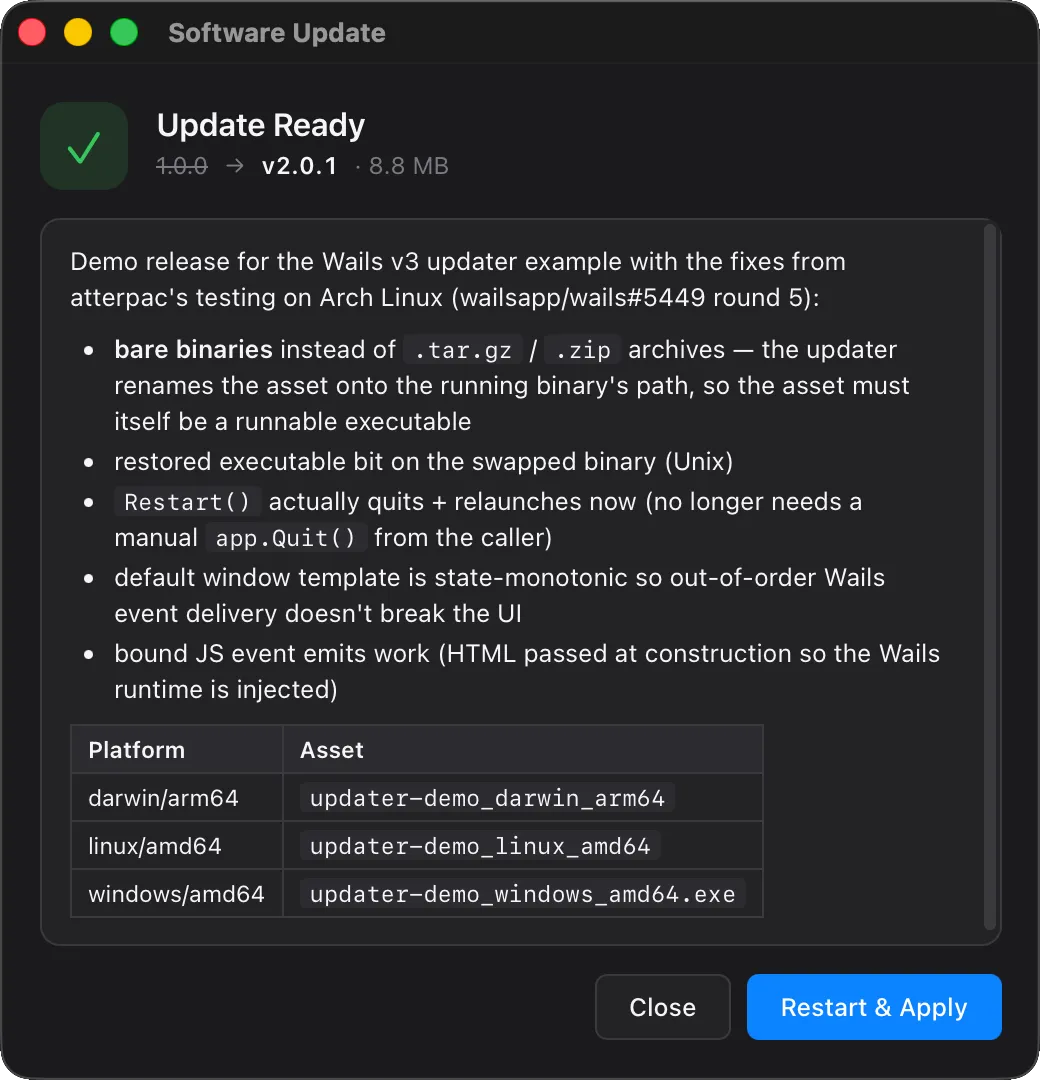
- Hero icon flips from blue ↓ (“Update Available”) to green ✓ (“Update Ready”).
- Subtitle shows
v1.0.0 → v2.0.0 · <size>. - Release notes panel renders your Markdown with bold, code spans, and the table.
- Progress bar fills during download (it’ll be quick — the binary is small).
The Updater stages the new binary in a temp directory. To complete the update:
- Click Restart & Apply.
- Your app exits, the helper swaps the binary, the new binary relaunches.
- The relaunched app reports
currentVersion = "1.0.0"(because we hardcoded it), but the bytes on disk match the v2.0.0 build.
In a real app,
currentVersionwould be set at build time via-ldflagsso the new binary knows it’s now v2.0.0 and a subsequent check finds no update. -
Wire
Section titled “Wire currentVersion to the build”currentVersionto the buildReplace the constant with a build-time variable:
main.go var (currentVersion = "dev" // overridden by -ldflags at release time)Then in your build command:
Terminal window wails3 task build:darwin -- -ldflags "-X main.currentVersion=2.0.0"Or add the
-ldflagsto yourTaskfile.ymlso it picks up fromgit describe --tags. -
Add cryptographic signing (recommended for production)
Section titled “Add cryptographic signing (recommended for production)”The SHA256SUMS path verifies integrity (the bytes match what GitHub stored) but not authenticity (those bytes were produced by your release pipeline, not a compromised maintainer account). For tamper-resistance, sign each release with an Ed25519 key:
Terminal window # One-time: generate the keypairssh-keygen -t ed25519 -f updater-key -N "" -C "wails-updater"# updater-key — keep secret (build server, HSM, password manager)# updater-key.pub — bundle in your appFor each release, sign the SHA-256 digest of each asset with your private key. A small Go helper:
cmd/sign-release/main.go package mainimport ("crypto/ed25519""crypto/sha256""encoding/base64""fmt""io""os")func main() {priv, _ := os.ReadFile("updater-key")key := ed25519.PrivateKey(priv) // raw 64-byte private keyf, _ := os.Open(os.Args[1])defer f.Close()h := sha256.New()_, _ = io.Copy(h, f)sig := ed25519.Sign(key, h.Sum(nil))fmt.Println(base64.StdEncoding.EncodeToString(sig))}The default GitHub provider doesn’t currently fetch a separate signature file — you can write a custom provider that does, or switch to keygen.sh which signs every artifact server-side and exposes both the digest and signature via its API.
Embed the public key in your app:
main.go //go:embed updater-key.pubvar updaterPublicKey []byteapp.Updater.Init(updater.Config{CurrentVersion: currentVersion,PublicKey: updaterPublicKey,Providers: []updater.Provider{gh},})With
PublicKeyset, any release that ships aSignaturemust verify against this key. The release source has no way to substitute its own key — that’s the whole point of pinning out-of-band at build time. -
Customise the window
Section titled “Customise the window”The default window covers the common case. Three escape hatches if you need more control — pick one based on how much you want to customise:
app.Updater.Init(updater.Config{// …Window: &updater.BuiltinWindow{CSS: `:root { --accent: #ff6f00; --radius: 16px; }`,},})See the Theme via CSS variables section for the full variable list.
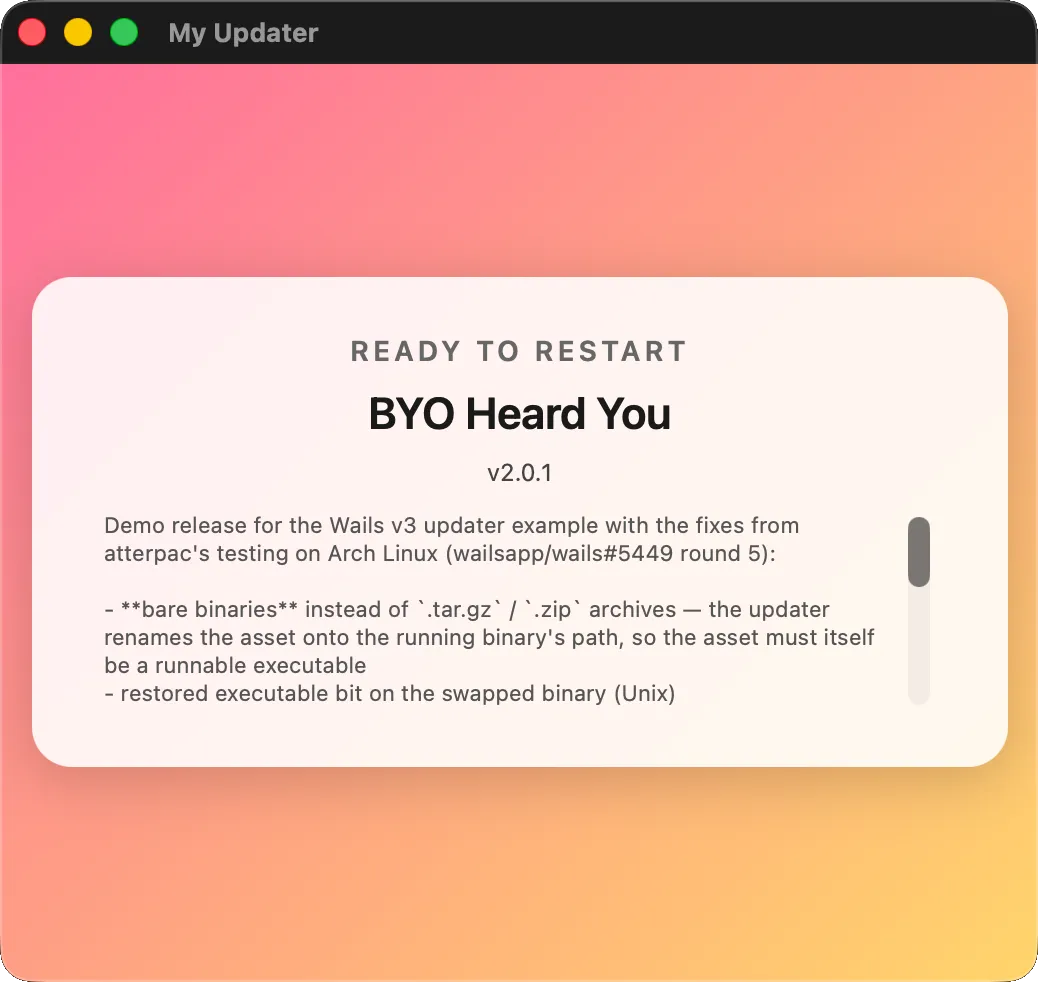
//go:embed updater-window.htmlvar updaterHTML stringapp.Updater.Init(updater.Config{// …Window: &updater.BuiltinWindow{HTML: updaterHTML},})Your HTML must subscribe to
updater:*events and emitupdater:user:*actions via the Wails event channel. See Replace the template for the JS shim.myWin := app.Window.NewWithOptions(application.WebviewWindowOptions{Title: "My App Updater",Width: 520, Height: 460,HTML: updaterHTML,AllowSimpleEventEmit: true, // required — see security note})app.Updater.Init(updater.Config{// …Window: updater.BYOWindow(myWin.AsUpdaterWindow()),})Useful when you already have your own window infrastructure and want the updater to drive it instead of opening another window. A completely custom HTML template — driven by the same updater events as the default — looks like this:
-
Run automatic checks in the background
Section titled “Run automatic checks in the background”To check on a timer instead of (or in addition to) the menu click:
app.Updater.Init(updater.Config{CurrentVersion: currentVersion,Providers: []updater.Provider{gh},PublicKey: updaterPublicKey,CheckInterval: 6 * time.Hour,})Each tick runs the same
CheckAndInstallflow as a manual click. SetWindow: updater.WindowNoneif you want the periodic check to be silent until something is actually found — then subscribe toEventUpdateAvailableyourself to decide what UX to show.
You’re done
Section titled “You’re done”You now have a Wails app that:
- Checks GitHub Releases for updates on demand and on a timer.
- Renders release notes as Markdown in a polished default window.
- Verifies downloads against a SHA-256 digest you publish.
- Optionally verifies an Ed25519 signature against a public key you embed at build time.
- Swaps the running binary in-place and relaunches automatically.
Next steps
Section titled “Next steps”- The Updater guide has the full API reference, every event, every config option, and the helper-mode swap mechanics.
- Look at
v3/examples/updaterfor a complete working example you can clone. - The test target repo
wailsapp/updater-demoshows the recommended release-asset layout.
Things to watch out for in production
Section titled “Things to watch out for in production”- Code signing on macOS — Gatekeeper requires the swapped binary to be signed and notarised. Sign your
.appbundle before zipping it for the release. The updater preserves the bytes verbatim; it doesn’t re-sign anything. - Antivirus on Windows — unsigned
.exefiles downloaded from the internet can trigger SmartScreen warnings. Sign your binary with an Authenticode certificate, or accept that users on locked-down machines may need to whitelist your app. - Atomic releases — publish
SHA256SUMS(and your binaries) together, not in separate commits. The updater fetches the sidecar separately from the binary; if they drift the digest check fails closed. - Skipped versions — the default window’s “Skip This Version” button records the skip locally. If you ship a critical security update, give it a new version number so it doesn’t get auto-skipped by users who dismissed an earlier release.