

Wie Wails funktioniert
Wails ist ein Framework zum Erstellen von Desktop-Anwendungen mit Go für das Backend und Webtechnologien für das Frontend. Im Gegensatz zu Electron bündelt Wails jedoch keinen Browser, sondern verwendet das native WebView des Betriebssystems.
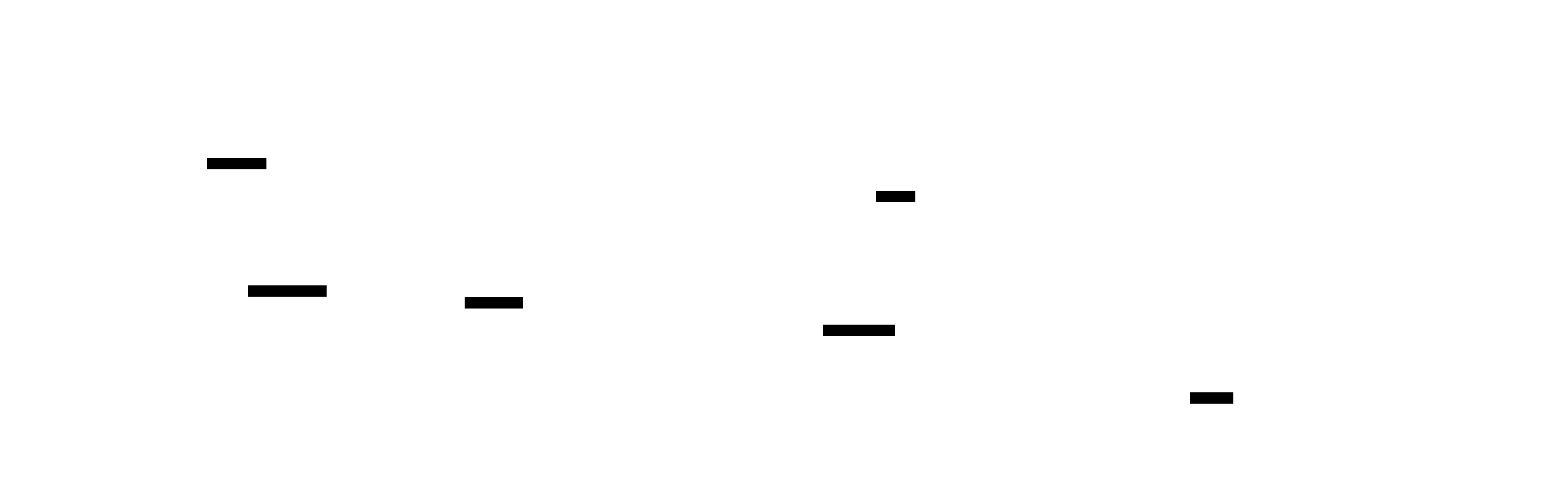
Hauptunterschiede zu Electron:
| Aspekt | Wails | Electron |
|---|---|---|
| Browser | Vom Betriebssystem bereitgestelltes WebView | Gebündeltes Chromium (~100MB) |
| Backend | Go (kompiliert) | Node.js (interpretiert) |
| Kommunikation | In-Memory-Bridge | IPC (Inter-Prozess-Kommunikation) |
| Paketgröße | ~15MB | ~150MB |
| Speicher | ~10MB | ~100MB+ |
| Startzeit | <0,5s | 2-3s |
Kernkomponenten
Abschnitt betitelt „Kernkomponenten“1. Native WebView
Abschnitt betitelt „1. Native WebView“Wails verwendet die im Betriebssystem integrierte Web-Rendering-Engine:
WebView2 (Microsoft Edge WebView2)
- Basierend auf Chromium (selbe Engine wie der Edge-Browser)
- Vorinstalliert auf Windows 10/11
- Automatische Updates über Windows Update
- Vollständige Unterstützung moderner Webstandards
WebKit (Rendering-Engine von Safari)
- In macOS integriert
- Gleiche Engine wie im Safari-Browser
- Hervorragende Leistung und Akkulaufzeit
- Vollständige Unterstützung moderner Webstandards
WebKitGTK (GTK-Port von WebKit)
- Installation über Paketmanager
- Gleiche Engine wie GNOME Web (Epiphany)
- Gute Standards-Unterstützung
- Leichtgewichtig und leistungsstark
Warum das wichtig ist:
- Kein gebündelter Browser → Kleinere App-Größe
- OS-nativ → Bessere Integration und Leistung
- Automatische Updates → Sicherheitspatches durch OS-Updates
- Vertrautes Rendering → Gleich wie im Systembrowser
2. Die Wails-Bridge
Abschnitt betitelt „2. Die Wails-Bridge“Die Bridge ist das Herzstück von Wails – sie ermöglicht die direkte Kommunikation zwischen Go und JavaScript.
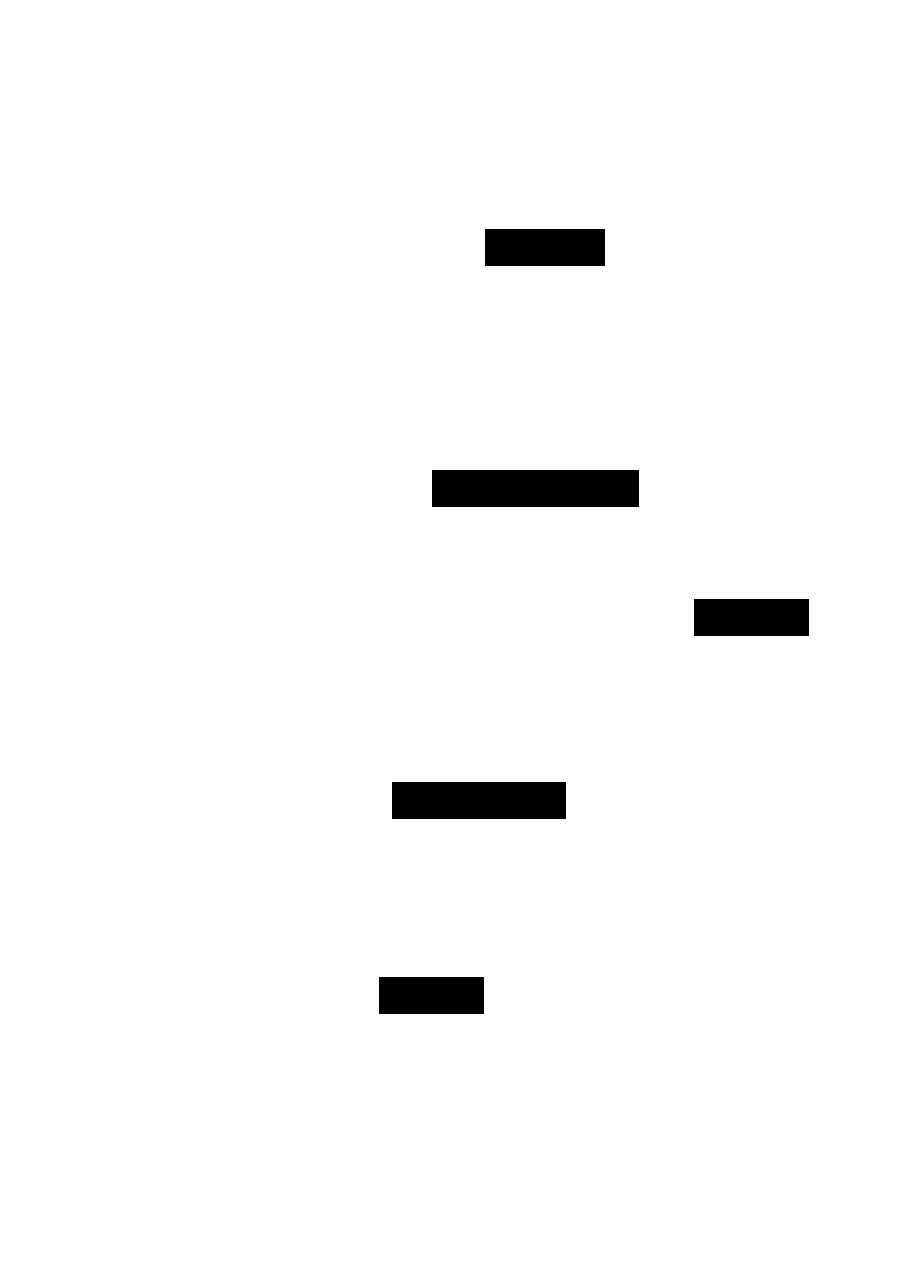
So funktioniert es:
- Frontend ruft eine Go-Methode auf (über automatisch generierte Bindings)
- Bridge kodiert den Aufruf in JSON (Methodenname + Argumente)
- Router findet die Go-Methode in den registrierten Diensten
- Go-Methode wird ausgeführt und gibt einen Wert zurück
- Bridge decodiert das Ergebnis und sendet es an das Frontend zurück
- Promise wird aufgelöst in JavaScript mit dem Ergebnis
Leistungseigenschaften:
- In-Memory: Keine Netzwerk-Overhead, kein HTTP
- Zero-Copy wo möglich (für große Datenmengen)
- Standardmäßig asynchron: Nicht-blockierend auf beiden Seiten
- Typsicher: TypeScript-Definitionen werden automatisch generiert
3. Dienstesystem
Abschnitt betitelt „3. Dienstesystem“Dienste sind der empfohlene Weg, um Go-Funktionalität für das Frontend verfügbar zu machen.
// Define a service (just a regular Go struct)type GreetService struct {    prefix string}
// Methods with exported names are automatically availablefunc (g *GreetService) Greet(name string) string {    return g.prefix + name + "!"}
func (g *GreetService) GetTime() time.Time {    return time.Now()}
// Register the serviceapp := application.New(application.Options{    Services: []application.Service{        application.NewService(&GreetService{prefix: "Hello, "}),    },})
Dienstentdeckung:
- Wails scant Ihre Struktur beim Start
- Exportierte Methoden werden vom Frontend aufrufbar
- Typinformationen werden für TypeScript-Bindings extrahiert
- Fehlerbehandlung ist automatisch (Go-Fehler → JS-Ausnahmen)
Generierte TypeScript-Bindung:
// Auto-generated in frontend/bindings/GreetService.tsexport function Greet(name: string): Promise<string>export function GetTime(): Promise<Date>Warum Dienste?
- Typsicher: Vollständige TypeScript-Unterstützung
- Automatische Entdeckung: Keine manuelle Registrierung von Methoden
- Organisiert: Verwandte Funktionalität gruppieren
- Testbar: Dienste sind einfache Go-Strukturen
Weitere Informationen zu Diensten →
4. Ereignissystem
Abschnitt betitelt „4. Ereignissystem“Ereignisse ermöglichen Pub/Sub-Kommunikation zwischen Komponenten.
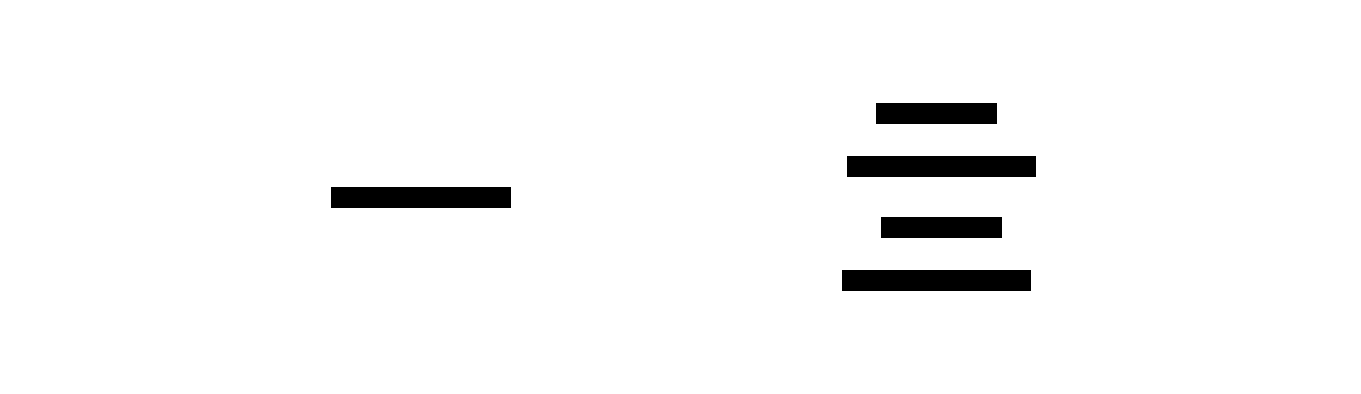
Verwendungsfälle:
- Fensterkommunikation: Ein Fenster benachrichtigt andere
- Hintergrundaufgaben: Go-Dienst benachrichtigt UI über Fortschritt
- Statussynchronisation: Mehrere Fenster synchron halten
- Losere Kopplung: Komponenten benötigen keine direkten Referenzen
Beispiel:
// Go: Emit an eventapp.Event.Emit("user-logged-in", user)// JavaScript: Listen for eventimport { Events } from '@wailsio/runtime'
Events.On('user-logged-in', (user) => { console.log('User logged in:', user)})Weitere Informationen zu Ereignissen →
Anwendungslebenszyklus
Abschnitt betitelt „Anwendungslebenszyklus“Das Verständnis des Lebenszyklus hilft Ihnen zu wissen, wann Sie Ressourcen initialisieren und bereinigen sollten.

Lifecycle hooks:
app := application.New(application.Options{    Name: "My App",
    // Called before windows are created    OnStartup: func(ctx context.Context) {        // Initialise database, load config, etc.    },
// Called when app is about to quit OnShutdown: func() { // Save state, close connections, etc. },})Build Process
Abschnitt betitelt „Build Process“Understanding how Wails builds your application:
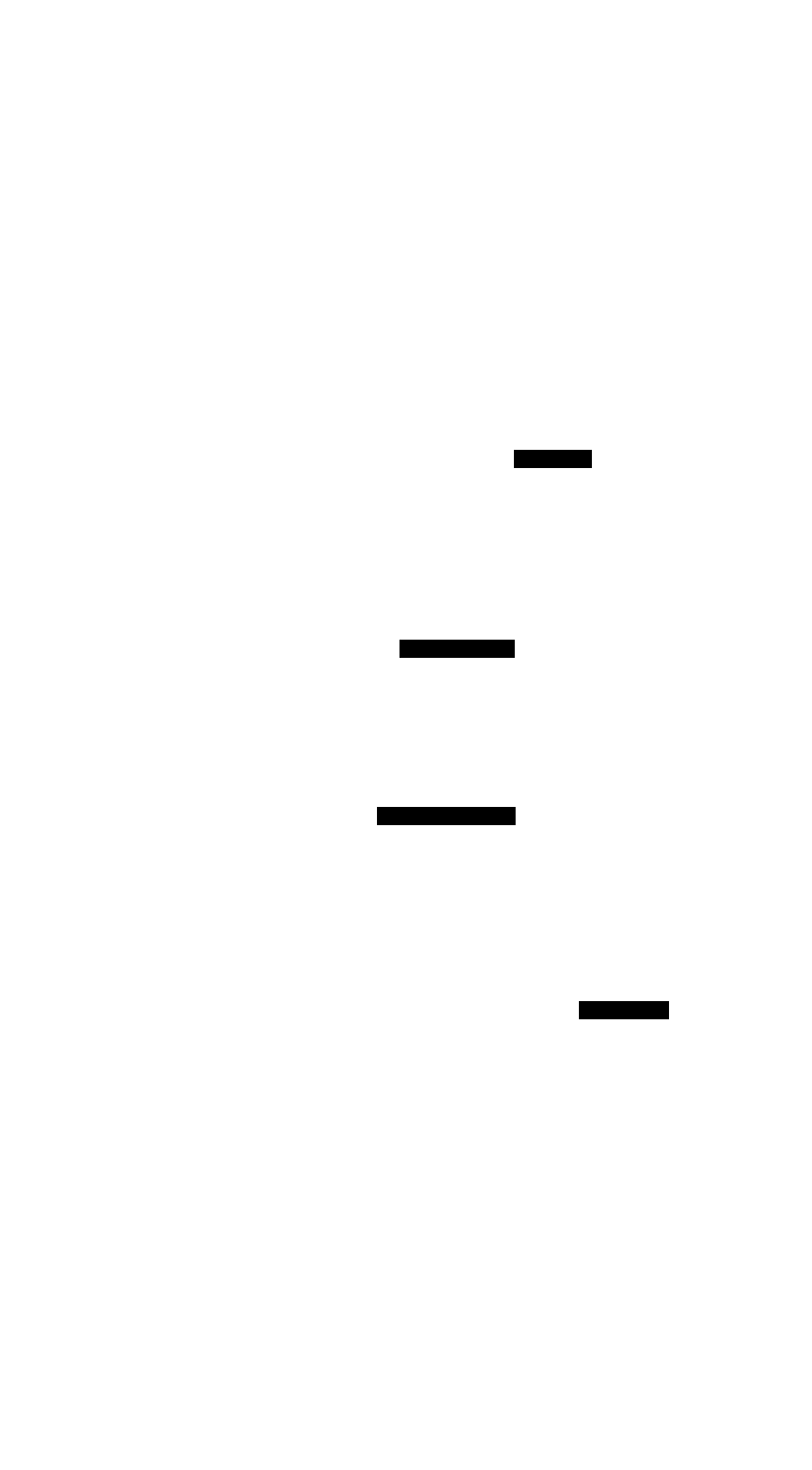
Build steps:
-
Analyse Go code
- Scan services for exported methods
- Extract parameter and return types
- Generate method signatures
-
Generate TypeScript bindings
- Create
.tsfiles for each service - Include full type definitions
- Add JSDoc comments
- Create
-
Build frontend
- Run your bundler (Vite, webpack, etc.)
- Minify and optimise
- Output to
frontend/dist/
-
Compile Go
- Compile with optimisations (
-ldflags="-s -w") - Include build metadata
- Platform-specific compilation
- Compile with optimisations (
-
Embed assets
- Embed frontend files into Go binary
- Compress assets
- Create single executable
Result: A single native executable with everything embedded.
Development vs Production
Abschnitt betitelt „Development vs Production“Wails behaves differently in development and production:
Characteristics:
- Hot reload: Frontend changes reload instantly
- Source maps: Debug with original source
- DevTools: Browser DevTools available
- Logging: Verbose logging enabled
- External frontend: Served from dev server (Vite)
How it works:

Benefits:
- Instant feedback on changes
- Full debugging capabilities
- Faster iteration
Characteristics:
- Embedded assets: Frontend built into binary
- Optimised: Minified, compressed
- No DevTools: Disabled by default
- Minimal logging: Errors only
- Single file: Everything in one executable
How it works:
Benefits:
- Single file distribution
- Smaller size (minified)
- Better performance
- No external dependencies
Memory Model
Abschnitt betitelt „Memory Model“Understanding memory usage helps you build efficient applications.
Memory regions:
-
Go Heap
- Your services and application state
- Managed by Go garbage collector
- Typically 5-10MB for simple apps
-
WebView Memory
- DOM, JavaScript heap, CSS
- Managed by WebView’s engine
- Typically 10-20MB for simple apps
-
Bridge Memory
- Message buffers for communication
- Minimal overhead (<1MB)
- Zero-copy for large data where possible
Optimisation tips:
- Avoid large data transfers: Pass IDs, fetch details on demand
- Use events for updates: Don’t poll from frontend
- Stream large files: Don’t load entirely into memory
- Clean up listeners: Remove event listeners when done
Learn more about performance →
Security Model
Abschnitt betitelt „Security Model“Wails provides a secure-by-default architecture:
Security features:
-
Method whitelisting
- Only exported methods are callable
- Private methods are inaccessible
- Explicit service registration required
-
Type validation
- Arguments checked against Go types
- Invalid types rejected
- Prevents injection attacks
-
No eval()
- Frontend can’t execute arbitrary Go code
- Only predefined methods callable
- No dynamic code execution
-
Context isolation
- Each window has its own context
- Services can check caller context
- Permissions per window possible
Best practices:
- Validate user input in Go (don’t trust frontend)
- Use context for authentication/authorisation
- Sanitise file paths before file operations
- Rate limit expensive operations
Next Steps
Abschnitt betitelt „Next Steps“Application Lifecycle - Understand startup, shutdown, and lifecycle hooks
Learn More →
Go-Frontend Bridge - Deep dive into how the bridge works
Learn More →
Build System - Understand how Wails builds your application
Learn More →
Start Building - Apply what you’ve learned in a tutorial Tutorials →
Fragen zur Architektur? Stellen Sie diese im Discord oder schauen Sie in die API-Referenz.