

Updater
The updater ships in-app software updates without forcing you to build your own download / verify / swap pipeline. It sits on app.Updater, accepts one or more pluggable Providers (GitHub Releases, keygen.sh, Sparkle AppCast, the open Wails Update Manifest protocol, or your own), authenticates downloads against a configured public key, swaps the running binary safely, and surfaces every transition through the standard Wails event bus.
Quick start
Section titled “Quick start”package main
import ( "context" "log"
"github.com/wailsapp/wails/v3/pkg/application" "github.com/wailsapp/wails/v3/pkg/updater" "github.com/wailsapp/wails/v3/pkg/updater/providers/github")
func main() { app := application.New(application.Options{Name: "Demo"})
gh, _ := github.New(github.Config{Repository: "myorg/myapp"}) if err := app.Updater.Init(updater.Config{ CurrentVersion: "1.0.0", Providers: []updater.Provider{gh}, }); err != nil { log.Fatal(err) }
if err := app.Updater.CheckAndInstall(context.Background()); err != nil { log.Printf("update: %v", err) }
_ = app.Run()}That opens the framework’s update window, checks GitHub, downloads the platform asset, verifies it, swaps the binary, and waits for the user to restart.
The lifecycle
Section titled “The lifecycle”app.Updater is a state machine with these states (updater.State):
| State | When |
|---|---|
unconfigured | Before Init is called |
idle | After Init, before any check |
checking | A Check is in flight |
up-to-date | The latest provider response said the caller is current |
available | A new release was found; not yet downloading |
downloading | Bytes are streaming from the provider |
verifying | Download complete, signature/digest being checked |
installing | Verified bytes being unpacked and renamed into the staging dir |
ready | Update staged; call Restart to apply |
error | Any prior step failed |
You can read the current state with app.Updater.State() at any time. Every transition also emits a Wails event (see Events).
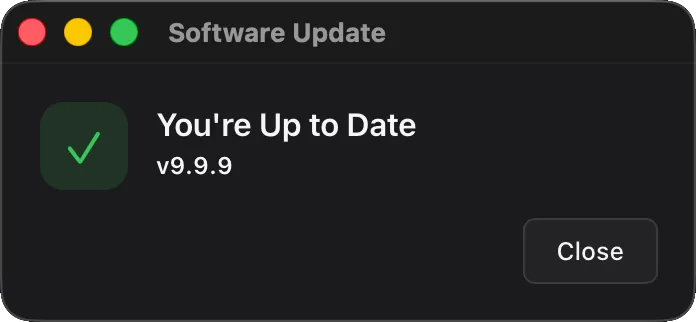
The default window reflects the current state automatically — for example, when Check returns no upgrade the user sees this and dismisses with Close:
Providers
Section titled “Providers”A Provider is anything that satisfies this interface:
type Provider interface { Name() string Check(ctx context.Context, req CheckRequest) (*Release, error) Download(ctx context.Context, r *Release, dst io.Writer, onProgress func(written, total int64)) error}Four implementations ship in-tree.
GitHub Releases — updater/providers/github
Section titled “GitHub Releases — updater/providers/github”gh, err := github.New(github.Config{ Repository: "myorg/myapp", // your owner/repo (required) Token: "ghp_…", // optional; raises rate limit + private repos Prerelease: false, // include pre-releases in latest lookup ChecksumAsset: "SHA256SUMS", // optional sibling asset for digest verification BaseURL: "", // optional override (e.g. GitHub Enterprise) AssetMatcher: nil, // optional custom asset-picker; nil uses DefaultAssetMatcher HTTPClient: nil, // optional client override})The default asset matcher picks by GOOS + GOARCH substring on the filename, recognising common aliases (amd64 / x86_64 / x64, arm64 / aarch64, 386 / i386 / x86 / ia32). For custom naming schemes:
gh, _ := github.New(github.Config{ Repository: "myorg/myapp", AssetMatcher: func(req updater.CheckRequest, assets []github.ReleaseAsset) int { for i, a := range assets { if strings.Contains(a.Name, "my-naming-convention") && strings.Contains(a.Name, req.Platform) { return i } } return -1 // no match },})ChecksumAsset is the name of a sibling release asset whose content is <sha256> <filename> lines (the format sha256sum and shasum -a 256 produce). The provider fetches it during Check, finds the line that matches the picked artifact, and populates Release.Verification.Digest so the framework verifies the download.
keygen.sh — updater/providers/keygen
Section titled “keygen.sh — updater/providers/keygen”kg, err := keygen.New(keygen.Config{ Account: "your-account-slug", // required Product: "product-uuid", // optional but recommended when account has multiple products Package: "", // optional further narrowing Channel: "stable", // "stable" / "rc" / "beta" / "alpha" / "dev" Filetype: "", // optional artifact filetype filter ("dmg", "exe", …) Token: "prod-…", // product / environment / user / admin token; wins over LicenseKey LicenseKey: "", // license key auth (used only when Token is empty) BaseURL: "", // optional API base override HTTPClient: nil, // optional client override; redirect-strip wrapper still applied})The provider automatically maps keygen.sh’s per-artifact SHA-512 checksum and Ed25519ph signature into the framework’s Release.Verification block — no extra wiring required.
Token formats: keygen.sh tokens carry a role prefix (admi- / prod- / envi- / user-). The raw UUID you see in the dashboard is the token’s identifier, not its secret value — the secret is only visible at token-create time. See keygen.sh’s auth docs for details.
Sparkle AppCast — updater/providers/appcast
Section titled “Sparkle AppCast — updater/providers/appcast”ac, err := appcast.New(appcast.Config{ URL: "https://your.app/appcast.xml", // required Channel: "stable", // optional sparkle:channel filter HTTPClient: nil, // optional client override})Drops in to existing Sparkle / WinSparkle infrastructure unchanged. Reads sparkle:shortVersionString, <enclosure url type length sparkle:os sparkle:edSignature>, and sparkle:channel from the feed.
Sparkle 1’s DSA signatures (sparkle:dsaSignature) are not supported — projects on that signing scheme should rotate to EdDSA (Sparkle 2).
Wails Update Manifest — updater/providers/endpoint
Section titled “Wails Update Manifest — updater/providers/endpoint”ep, err := endpoint.New(endpoint.Config{ URL: "https://updates.example.com/check", // required; supports {{platform}} / {{arch}} / {{version}} / {{channel}} placeholders Channel: "stable", // optional channel filter Headers: nil, // optional headers, e.g. {"Authorization": "License <key>"} HTTPClient: nil, // optional client override; redirect-strip wrapper still applied})Speaks the open Wails Update Manifest protocol: one JSON document describing the latest release and its per-platform artifacts, with checksums and signatures inline. The same document works from a static file host (S3, GitHub Pages, any CDN — publish one manifest per channel listing all platforms) or from a dynamic update server (the provider sends platform, arch, version and channel with every check, so the server can return exactly one artifact or gate on a license).
URL placeholders make static layouts one line of config:
ep, _ := endpoint.New(endpoint.Config{ URL: "https://cdn.example.com/updates/{{platform}}/{{arch}}/stable.json",})Configured headers are sent on every manifest request; artifact downloads reuse them only on the manifest’s own host with no https to http downgrade, and the Authorization header is stripped on any cross-origin or downgrading redirect.
The CLI owns the publishing side: wails3 updater manifest digests, signs and describes your release files in one command, and wails3 updater verify re-checks the result before you upload. See Publishing with the wails3 CLI.
Fallback chain
Section titled “Fallback chain”Config.Providers is ordered. The updater walks it sequentially: the first provider that returns a release wins, the first that reports “up to date” short-circuits the chain (fallback is for “primary unreachable”, not “providers disagree”). An error advances to the next provider.
app.Updater.Init(updater.Config{ CurrentVersion: "1.0.0", Providers: []updater.Provider{ kg, // primary: licensed customers gh, // fallback: public mirror },})Writing your own provider
Section titled “Writing your own provider”Three methods, ~150 lines for a typical implementation. The Updater owns verification, atomic staging, swap, and the window — provider code resolves the next release and streams the bytes:
type CustomProvider struct { /* config */ }
func (p *CustomProvider) Name() string { return "custom" }
func (p *CustomProvider) Check(ctx context.Context, req updater.CheckRequest) (*updater.Release, error) {    // Hit your update endpoint, decide whether req.CurrentVersion is current,    // and return either nil (no upgrade) or a *Release with Artifact + optional    // Verification populated.    // Errors here drop through to the next provider in Config.Providers.}
func (p *CustomProvider) Download(ctx context.Context, r *updater.Release, dst io.Writer, onProgress func(int64, int64)) error {    // Stream the artifact's bytes to dst. Call onProgress(written, total) as    // bytes flow past; the Updater debounces emits to ~10 Hz on the event bus.}
Use the in-tree providers as references — they’re each one Go file.
Cryptographic verification
Section titled “Cryptographic verification”Releases are authenticated by the framework’s verifier using Config.PublicKey as the trust root:
//go:embed publickey.pemvar publicKey []byte
app.Updater.Init(updater.Config{    CurrentVersion: "1.0.0",    Providers:      []updater.Provider{...},    PublicKey:      publicKey,})
Supported algorithms (Release.Verification.SignatureAlgo):
| Algorithm | What’s signed | Notes |
|---|---|---|
ed25519 | The SHA-256 digest of the artifact | Used by Sparkle EdDSA |
ed25519ph | The full artifact via Ed25519ph’s pre-hash (SHA-512 internally) | Used by keygen.sh |
ecdsa-p256 | The SHA-256 digest of the artifact | Both raw r∥s and DER signatures accepted |
Plus digest-only (DigestAlgo: sha256 / sha512) when a release ships a hash but no signature.
Config.PublicKey is the ONLY trust anchor for signature verification — the release source has no way to substitute its own key. Releases that carry a Signature without a configured Config.PublicKey fail closed. The verifier computes the digest in a streaming pass during download, so even on multi-GB updates verification adds no extra disk pass.
Generating a signing key
Section titled “Generating a signing key”wails3 updater genkey# updater.key — keep secret, use to sign releases# updater.key.pub — bundle in your app via go:embedThe private key is PKCS#8 PEM, the public key PKIX PEM; Config.PublicKey accepts the .pub file as-is (it also accepts the raw 32-byte key or its base64, which genkey prints for inlining). Sign releases with wails3 updater manifest -key updater.key ... or wails3 updater sign; see Publishing with the wails3 CLI.
Or in Go:
import "crypto/ed25519"import "crypto/rand"
pub, priv, _ := ed25519.GenerateKey(rand.Reader)// Persist `priv` securely (HSM, signing CI, etc.); embed `pub` in your binary.
Artifact formats
Section titled “Artifact formats”Providers stream the bytes for whichever file you publish; the framework then unpacks it before the swap:
- Single binary (e.g.
myapp-linux-amd64) — used as-is. Common on Linux. .zip— extracted in place. The archive must contain exactly one top-level entry (typically a macOS.appbundle or a single binary). Recommended packaging for macOS..tar.gz/.tgz— extracted in place under the same single-top-level-entry rule. Useful for Linux distributions that ship a runtime tree alongside the binary.
Archives carrying more than one top-level entry are rejected: the framework swaps a single on-disk target, so “swap this archive into place” is ambiguous when the archive contains multiple things. .dmg and .pkg (macOS) and .msi (Windows) are not supported in v1 — distribute a .zip of the bundle instead. Extraction enforces zip-slip protection, rejects symlinks that escape the archive root, and caps total uncompressed size (2 GiB) and entry count (50 000).
The default window
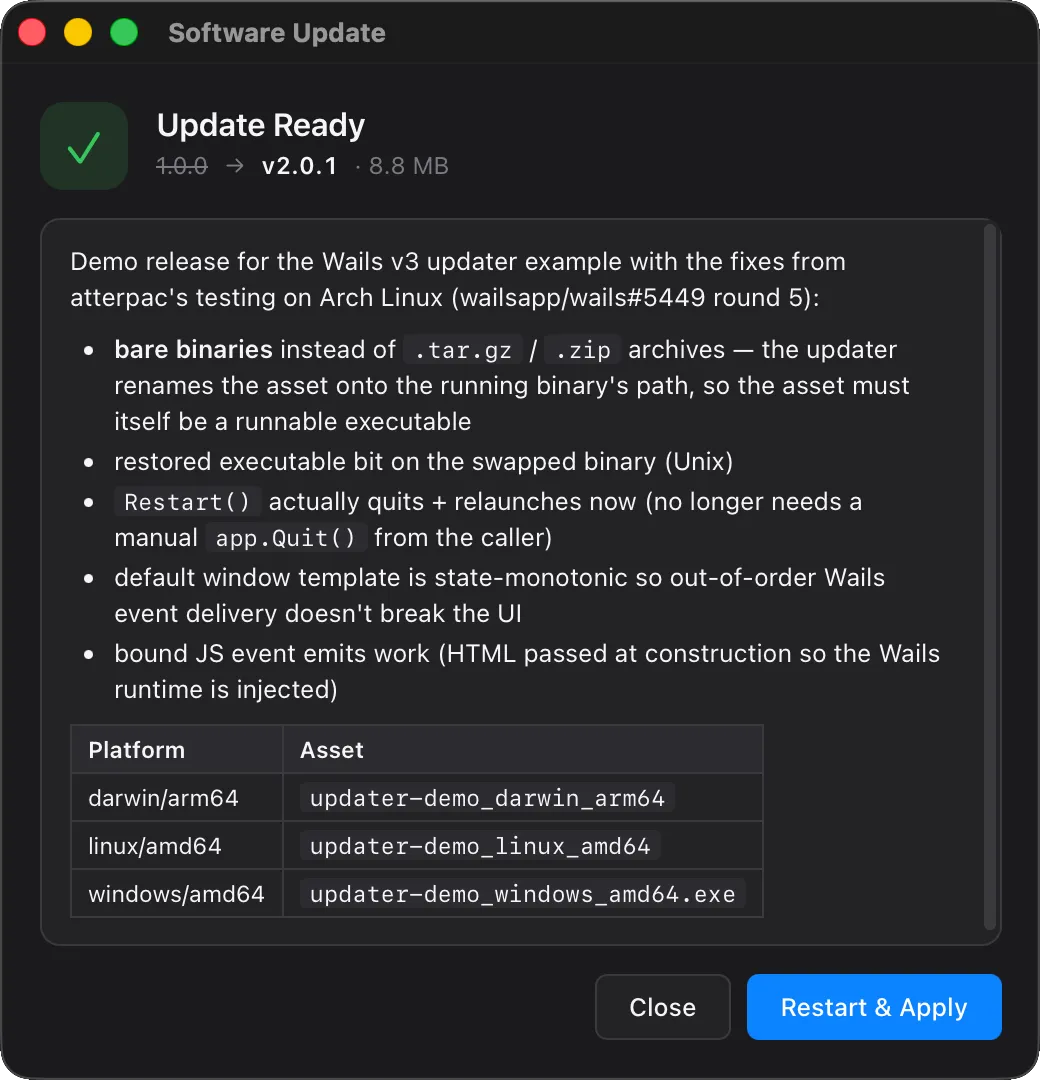
Section titled “The default window”app.Updater.CheckAndInstall(ctx) opens a 520×540 framework-owned window with:
- A state-driven hero icon (blue ↓ for available/downloading, green ✓ for ready/up-to-date, red ! for error)
- A version pill:
v1.0.0 → v2.0.1 · 8.8 MB - A scrollable release-notes panel with rendered Markdown (paragraphs, bold/italic, lists, GFM tables, inline code, fenced code blocks, h1–h3, links)
- A single primary action per state (Install / Restart & Apply / Try Again)
- Ghost-styled secondary actions (Skip This Version / Remind Me Later)
- Dark/light mode via
prefers-color-scheme - Indeterminate progress shimmer when total size is unknown
It listens to updater:* events on the Wails event bus and emits updater:user:* actions back to Go.
Theme via CSS variables
Section titled “Theme via CSS variables”app.Updater.Init(updater.Config{ // … Window: &updater.BuiltinWindow{ CSS: `:root { --accent: #ff6f00; --bg: #1a1a1a; --fg: #fafafa; }`, },})The default stylesheet exposes these variables — override any of them:
| Variable | Default (light) | Default (dark) |
|---|---|---|
--bg | #f8f8fa | #1a1a1c |
--surface | #ffffff | #232326 |
--surface-2 | #f0f0f3 | #2c2c30 |
--fg | #1d1d1f | #f5f5f7 |
--fg-dim | #6b6b73 | #b0b0b8 |
--fg-faint | #99999f | #7a7a82 |
--border | #d6d6dc | #3a3a3e |
--accent | #0a84ff | #0a84ff |
--accent-fg | #ffffff | — |
--success | #34c759 | — |
--error | #ff3b30 | — |
--radius | 10px | — |
--font | system stack | — |
Replace the template
Section titled “Replace the template”Provide your own HTML; it just needs to listen to wails:updater:* events and emit wails:updater:user:* actions:
app.Updater.Init(updater.Config{ // … Window: &updater.BuiltinWindow{ HTML: myCustomTemplate, },})InitialHTML windows are loaded with no asset-server origin, so they can’t dynamically fetch /wails/runtime.js. You have two ways to talk to the host from one:
- Just write HTML. The framework auto-injects a minimal
window.wails.Eventsshim into any window opened withWebviewWindowOptions.AllowSimpleEventEmit = trueandHTMLset — which is exactly what the updater’s builtin and BYO paths do. No build step required. This is the path the example below uses. - Bundle
@wailsio/runtimewith your preferred bundler (Vite, esbuild, Rollup) and import it into your custom HTML at build time.Events.Onworks out of the box because it’s purely client-side;Events.Emitgoes through the runtime’s fetch transport, which the null origin breaks — so install a tiny postMessage transport via the runtime’ssetTransporthook that routes throughwindow._wails.invoke("wails:event:emit:<name>"). The framework injection no-ops ifwindow.wails.Eventsis already in scope, so the two approaches don’t fight.
Either way, the JS you write in your custom HTML calls the same Events.On / Events.Emit API:
<script>const { On, Emit } = window.wails.Events;
On("wails:updater:update-available", (e) => {    const rel = e.data ?? e;    document.getElementById("ver").textContent = rel.version;});
document.getElementById("install").addEventListener("click",    () => Emit("wails:updater:user:install"));
// Ask the host to replay the current state so we paint correctly on (re)open.Emit("wails:updater:window:ready");</script>
The shim exposes the subset of the modern runtime that bare-name events need: Events.On(name, cb) returns an unsubscribe function, and Events.Emit(nameOrEventObject) routes to the host via the gated wails:event:emit: postMessage path. It’s installed once at page-load time before any of your inline scripts run.
If you want to override the shim (or you’re loading the full runtime some other way), set window.wails.Events before the page’s first <script> tag executes and the injection skips itself.
Window chrome
Section titled “Window chrome”Override window options (size, frameless, always-on-top) without touching the HTML:
Window: &updater.BuiltinWindow{ Options: updater.WindowOptions{ Title: "My App Updater", Width: 640, Height: 480, Frameless: true, AlwaysOnTop: true, DisableResize: false, },},Bring your own window
Section titled “Bring your own window”Drive the update flow against an *application.WebviewWindow you create yourself. The updater calls Show() / Close() / EmitEvent() on your window — your HTML decides what to render:
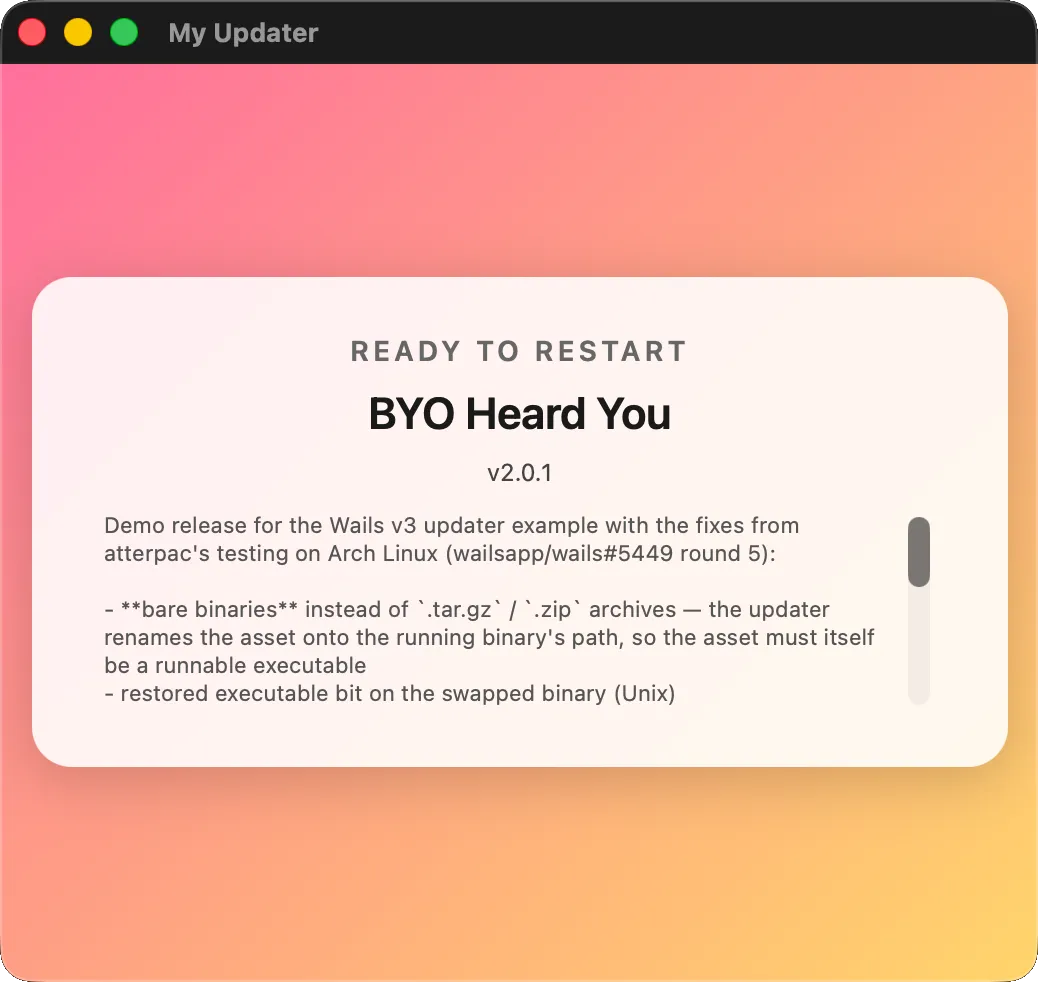
myWin := app.Window.NewWithOptions(application.WebviewWindowOptions{ Title: "My Updater", Width: 520, Height: 460, HTML: myCustomHTML, AllowSimpleEventEmit: true, // see security note below})app.Updater.Init(updater.Config{ // … Window: updater.BYOWindow(myWin.AsUpdaterWindow()),})Your HTML uses window.wails.Events.On / Events.Emit just like the builtin template — the framework’s auto-injected shim ships into any window with AllowSimpleEventEmit: true regardless of whether the window is framework-owned or yours. See Replace the template for the API.
Headless
Section titled “Headless”app.Updater.Init(updater.Config{ // … Window: updater.WindowNone,})No window is ever opened. Subscribe to updater:* events from your own UI (or your existing main window) and call app.Updater.CheckAndInstall(ctx) from a button handler. Useful for periodic background checks that should only surface when something is found, or for apps that integrate the update flow into a custom settings panel.
Events
Section titled “Events”Both Go and JavaScript subscribe through the standard Wails event bus. Don’t type the wire strings by hand — use the constants exported from the updater package (Go) or the runtime package (JS). Both layers share the same set of names, kept in sync by a regression test.
From Go
Section titled “From Go”The constants live in github.com/wailsapp/wails/v3/pkg/updater. Subscribe via app.Event.On(name, fn); the callback receives a *application.CustomEvent whose Data field is the typed payload listed in the event reference — type-assert, don’t JSON-decode:
import (    "log"
    "github.com/wailsapp/wails/v3/pkg/application"    "github.com/wailsapp/wails/v3/pkg/updater")
// …
app.Event.On(updater.EventUpdateAvailable, func(e *application.CustomEvent) {    rel, ok := e.Data.(*updater.Release)    if !ok { return }    log.Printf("update found: %s", rel.Version)})
app.Event.On(updater.EventDownloadProgress, func(e *application.CustomEvent) {    p, ok := e.Data.(updater.Progress)    if !ok { return }    log.Printf("%d / %d bytes (%.0f KB/s)", p.Written, p.Total, p.Rate/1024)})
app.Event.On(updater.EventError, func(e *application.CustomEvent) {    info, ok := e.Data.(updater.ErrorInfo)    if !ok { return }    log.Printf("update failed during %s: %s", info.Stage, info.Message)})
All available Go constants:
| Constant | Wire string |
|---|---|
updater.EventCheckStarted | wails:updater:check-started |
updater.EventUpdateAvailable | wails:updater:update-available |
updater.EventNoUpdate | wails:updater:no-update |
updater.EventDownloadStarted | wails:updater:download-started |
updater.EventDownloadProgress | wails:updater:download-progress |
updater.EventDownloadComplete | wails:updater:download-complete |
updater.EventVerifying | wails:updater:verifying |
updater.EventInstalling | wails:updater:installing |
updater.EventUpdateReady | wails:updater:update-ready |
updater.EventError | wails:updater:error |
updater.EventMeta | wails:updater:meta |
updater.EventWindowReady | wails:updater:window:ready |
updater.EventUserInstall | wails:updater:user:install |
updater.EventUserSkip | wails:updater:user:skip |
updater.EventUserRemind | wails:updater:user:remind |
updater.EventUserCancel | wails:updater:user:cancel |
updater.EventUserRestart | wails:updater:user:restart |
From JavaScript
Section titled “From JavaScript”The constants live under Updater.Events in @wailsio/runtime. Same names as Go, organised by sub-namespace (User.*, Window.*) for autocomplete discoverability:
import { Events, Updater } from "@wailsio/runtime";
Events.On(Updater.Events.UpdateAvailable, (e) => {    console.log("update found:", e.data.version);});
Events.On(Updater.Events.DownloadProgress, (e) => {    const p = e.data;    console.log(`${p.written} / ${p.total} bytes (${(p.rate/1024).toFixed(1)} KB/s)`);});
Events.On(Updater.Events.Error, (e) => {    const info = e.data;    console.error(`update failed during ${info.stage}: ${info.message}`);});
User-action events your custom HTML emits back to the host live under Updater.Events.User:
import { Updater } from "@wailsio/runtime";
document.getElementById("install-btn").addEventListener("click", () => {    // The framework window does this internally via the postMessage shim;    // shown here for BYO templates that need to drive the flow themselves.    window._wails.invoke("wails:event:emit:" + Updater.Events.User.Install);});
Event reference
Section titled “Event reference”Subscribe-side (host → page):
| Constant (Go) | Constant (JS) | Payload | When |
|---|---|---|---|
updater.EventCheckStarted | Updater.Events.CheckStarted | none | Before each Check round-trip |
updater.EventUpdateAvailable | Updater.Events.UpdateAvailable | *Release | Check found a newer release |
updater.EventNoUpdate | Updater.Events.NoUpdate | none | Check confirmed up-to-date |
updater.EventDownloadStarted | Updater.Events.DownloadStarted | *Release | Bytes start streaming |
updater.EventDownloadProgress | Updater.Events.DownloadProgress | Progress | ~10 Hz during download |
updater.EventDownloadComplete | Updater.Events.DownloadComplete | *Release | All bytes written, before verify |
updater.EventVerifying | Updater.Events.Verifying | *Release | Signature/digest check begins |
updater.EventInstalling | Updater.Events.Installing | *Release | Unpack + staging begins |
updater.EventUpdateReady | Updater.Events.UpdateReady | *Release | Restart pending |
updater.EventError | Updater.Events.Error | ErrorInfo | Any stage failed |
updater.EventMeta | Updater.Events.Meta | Meta | Once per session before snapshot replay |
Page-side (page → host) — your code subscribes if you write a custom template:
| Constant (Go) | Constant (JS) | When |
|---|---|---|
updater.EventWindowReady | Updater.Events.Window.Ready | Window finished loading; host replays current state |
updater.EventUserInstall | Updater.Events.User.Install | Primary action in available state |
updater.EventUserRestart | Updater.Events.User.Restart | Primary action in ready state |
updater.EventUserSkip | Updater.Events.User.Skip | ”Skip This Version” |
updater.EventUserRemind | Updater.Events.User.Remind | ”Remind Me Later” |
updater.EventUserCancel | Updater.Events.User.Cancel | Close button |
API reference
Section titled “API reference”updater.Config
Section titled “updater.Config”| Field | Type | Notes |
|---|---|---|
CurrentVersion | string | Required. Same string you tag releases with (no v prefix) |
Providers | []updater.Provider | Required. Ordered fallback chain |
PublicKey | []byte | PEM or raw bytes. Optional but signed releases fail closed without it |
CheckInterval | time.Duration | Non-zero starts a background poll loop calling CheckAndInstall |
Platform | string | Override runtime.GOOS for asset selection |
Arch | string | Override runtime.GOARCH for asset selection |
Channel | string | Currently informational; provider-specific channel filtering |
Window | updater.WindowOption | nil (builtin defaults), &BuiltinWindow{…}, BYOWindow(handle), or WindowNone |
Methods on *updater.Updater
Section titled “Methods on *updater.Updater”| Signature | Purpose |
|---|---|
Init(cfg Config) error | Configure. Returns ErrAlreadyConfigured on second call |
State() State | Current lifecycle phase |
CurrentVersion() string | The version passed to Init |
Check(ctx) (*Release, error) | Walk the provider chain. (rel, nil) = found, (nil, nil) = up-to-date, (nil, err) = all failed |
DownloadAndInstall(ctx) error | Stream, verify, extract (if archive), stage. Requires prior Check |
CheckAndInstall(ctx) error | Convenience: open window, Check, then DownloadAndInstall if found |
Restart(ctx) error | Spawn the helper, call Host.Quit, leave; helper swaps + relaunches |
DownloadedPath() string | Where the staged update lives on disk, or "" if none |
SkipVersion(v string) | Record v as skipped; subsequent Checks treat it as up-to-date |
SkippedVersion() string | Read the currently-skipped version |
StopPeriodicCheck() | Cancel the timer started by Config.CheckInterval and wait for the loop to return |
Errors
Section titled “Errors”| Sentinel | Returned by |
|---|---|
ErrAlreadyConfigured | Init after first success |
ErrNotConfigured | Any operation before Init |
ErrNoPendingRelease | DownloadAndInstall without prior Check |
ErrDownloadInProgress | DownloadAndInstall called while another is running |
ErrNotReady | Restart with no staged update |
How the swap works
Section titled “How the swap works”Restart re-execs the current binary with sentinel environment variables set. application.New detects them at startup and diverts to helper-mode:
- Helper waits up to 30 s for the parent PID to exit (
platformIsAlivepolls viasyscall.OpenProcess+GetExitCodeProcesson Windows,os.FindProcess+proc.Signal(syscall.Signal(0))on Unix). - Helper backs up the target (copy for files, recursive copy for macOS
.appbundle directories). - Helper replaces the target with the staged artifact, retrying up to 20 times with a 500 ms backoff between attempts:
- Unix —
os.RemoveAll(target)+os.Rename(newPath, target). Open file descriptors against the old inode remain valid. - Windows —
os.Rename(target, target.old.<nanos>)+os.Rename(newPath, target). Windows allows renaming files whose image is still mapped, but not deleting them; on the next update the helper sweeps any leftover.old.*siblings whose owning kernel mapping has been released.
- Unix —
- Helper restores the original executable mode on the new binary (the downloaded file was created with the default umask, which drops
+xon Unix; on Windows this is a no-op). - Helper scrubs the helper-mode env vars and re-launches the (now-replaced) binary.
- Helper exits.
If the launch fails, the helper restores the backup. If the parent never exits within 30 s, the helper aborts before touching the target (so the user keeps a working app even if a shutdown dialog blocks Quit).
For macOS .app bundles distributed as .zip (the recommended packaging), the archive is unpacked between verify and ready so the helper has a real directory to swap into place.
Periodic checking
Section titled “Periodic checking”app.Updater.Init(updater.Config{ // … CheckInterval: 6 * time.Hour,})When CheckInterval > 0, a background goroutine calls CheckAndInstall on the configured interval. Ticks that arrive while another flow is already in progress (checking / downloading / verifying / installing) are dropped — concurrent state machines aren’t supported.
For silent background polling that only surfaces when something is found, set Window: updater.WindowNone and react to EventUpdateAvailable from your own UI.
Skip & remind
Section titled “Skip & remind”The default window’s “Skip This Version” button records the available version via SkipVersion(rel.Version). Subsequent Checks find the same version and treat it as up-to-date (until the user updates CurrentVersion, which happens automatically after a successful Restart). “Remind Me Later” just closes the window without recording anything.
// Reading what the user skipped (e.g. to surface in app settings)if v := app.Updater.SkippedVersion(); v != "" {    log.Printf("user skipped %s", v)}
// Programmatically clearing the skip:app.Updater.SkipVersion("")
Distribution checklist
Section titled “Distribution checklist”Before you publish a release that the updater will install:
- Pick the right archive format. macOS:
.zipof the.appbundle. Linux: single binary or.tar.gz. Windows: single.exeor.zip..dmg/.msi/.pkgare not supported. - Sign the artifact with the private key matching
Config.PublicKey. For provider-published feeds (keygen.sh, AppCast), follow each provider’s signing workflow. For GitHub Releases withChecksumAsset, generate aSHA256SUMSfile withsha256sum/shasum -a 256. - Match the version string.
Config.CurrentVersionand the release’s version tag must match exactly (e.g.1.0.0↔ tagv1.0.0; the leadingvis stripped on the provider side). - Test the swap on the target platform at least once before shipping — codesigning, notarization, and Gatekeeper handling are platform-specific and not covered by the updater itself.
Troubleshooting
Section titled “Troubleshooting”“signature requires a public key but none configured” — the release has a Signature field but Config.PublicKey is empty. Set the public key or change your release pipeline to not include a signature.
“digest mismatch” — the downloaded bytes don’t match what the provider promised. Usually a partial download (network hiccup) or a corrupted artifact. Re-running often fixes it.
Window opens but immediately disappears, no markdown, no progress — your custom HTML didn’t invoke wails:runtime:ready. See the Replace the template shim.
Windows update never completes; helper log says “remove old (attempt N): Access is denied” — only happens on pre-de764fb versions of this PR; the current implementation uses rename-aside which doesn’t suffer this. Upgrade.
macOS Gatekeeper blocks the swapped binary — code-signing has to be preserved end-to-end. Sign the original .app and re-sign the relaunched binary if your build pipeline modifies entitlements at update time.
See also
Section titled “See also”- Runnable example:
v3/examples/updater - Test demo repo:
wailsapp/updater-demo - Tutorial: Adding self-updates to a Wails app