

Catatan
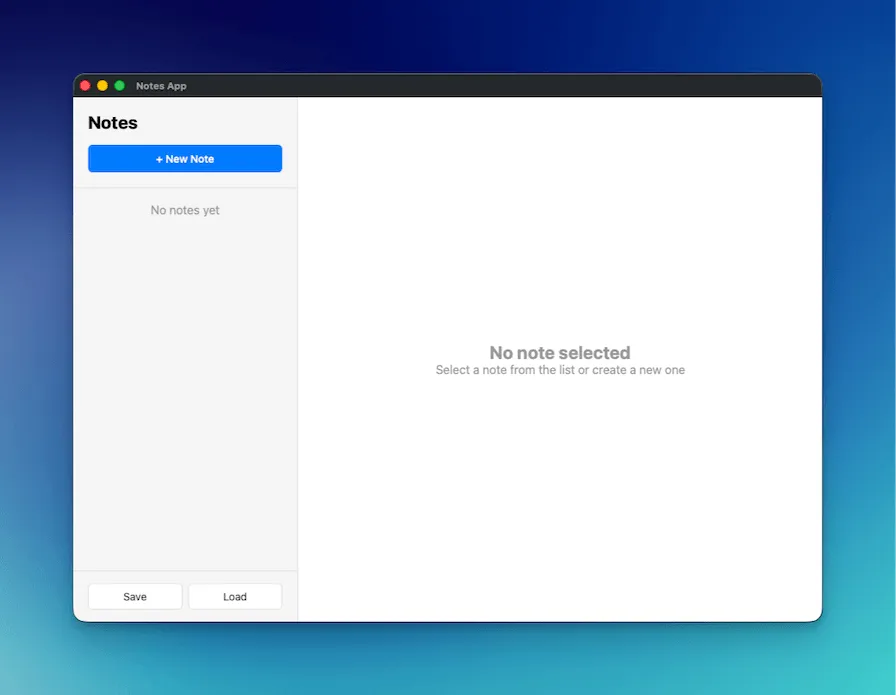
Dalam tutorial ini, Anda akan membangun aplikasi catatan yang mendemonstrasikan operasi file, dialog native, dan pola aplikasi desktop modern menggunakan Wails v3.
Yang Akan Anda Bangun
Section titled “Yang Akan Anda Bangun”- Aplikasi catatan lengkap dengan fungsi buat, edit, dan hapus
- Dialog save/open file native untuk impor dan ekspor catatan
- Auto-save saat mengetik dengan debounce untuk mengurangi pembaruan yang tidak perlu
- Tata letak dua kolom profesional (sidebar + editor) meniru Apple Notes
Yang Akan Anda Pelajari
Section titled “Yang Akan Anda Pelajari”- Menggunakan dialog file native di Wails (
SaveFileDialog,OpenFileDialog,InfoDialog) - Bekerja dengan file JSON untuk persistensi data
- Mengimplementasikan pola auto-save dengan debounce
- Membangun UI desktop profesional dengan CSS modern
- Serialisasi JSON struct Go yang proper
Setup Proyek
Section titled “Setup Proyek”-
Buat proyek Wails baru
Terminal window wails3 init -n notes-app -t vanillacd notes-app -
Buat NotesService
Buat file baru
notesservice.godi root proyek:package mainimport ("encoding/json""errors""os""time""github.com/wailsapp/wails/v3/pkg/application")type Note struct {ID string `json:"id"`Title string `json:"title"`Content string `json:"content"`CreatedAt time.Time `json:"createdAt"`UpdatedAt time.Time `json:"updatedAt"`}type NotesService struct {notes []Note}func NewNotesService() *NotesService {return &NotesService{notes: make([]Note, 0),}}// GetAll returns all notesfunc (n *NotesService) GetAll() []Note {return n.notes}// Create creates a new notefunc (n *NotesService) Create(title, content string) Note {note := Note{ID: generateID(),Title: title,Content: content,CreatedAt: time.Now(),UpdatedAt: time.Now(),}n.notes = append(n.notes, note)return note}// Update updates an existing notefunc (n *NotesService) Update(id, title, content string) error {for i := range n.notes {if n.notes[i].ID == id {n.notes[i].Title = titlen.notes[i].Content = contentn.notes[i].UpdatedAt = time.Now()return nil}}return errors.New("note not found")}// Delete deletes a notefunc (n *NotesService) Delete(id string) error {for i := range n.notes {if n.notes[i].ID == id {n.notes = append(n.notes[:i], n.notes[i+1:]...)return nil}}return errors.New("note not found")}// SaveToFile saves notes to a filefunc (n *NotesService) SaveToFile() error {path, err := application.Get().Dialog.SaveFile().SetFilename("notes.json").AddFilter("JSON Files", "*.json").PromptForSingleSelection()if err != nil {return err}data, err := json.MarshalIndent(n.notes, "", " ")if err != nil {return err}if err := os.WriteFile(path, data, 0644); err != nil {return err}application.Get().Dialog.Info().SetTitle("Success").SetMessage("Notes saved successfully!").Show()return nil}// LoadFromFile loads notes from a filefunc (n *NotesService) LoadFromFile() error {path, err := application.Get().Dialog.OpenFile().AddFilter("JSON Files", "*.json").PromptForSingleSelection()if err != nil {return err}data, err := os.ReadFile(path)if err != nil {return err}var notes []Noteif err := json.Unmarshal(data, ¬es); err != nil {return err}n.notes = notesapplication.Get().Dialog.Info().SetTitle("Success").SetMessage("Notes loaded successfully!").Show()return nil}func generateID() string {return time.Now().Format("20060102150405")}Apa yang terjadi di sini:
- Struct Note: Mendefinisikan struktur data dengan tag JSON (lowercase) untuk serialisasi yang proper
- Operasi CRUD: GetAll, Create, Update, dan Delete untuk mengelola catatan di memori
- Dialog file: Menggunakan
application.Get().Dialog.SaveFile()danapplication.Get().Dialog.OpenFile()untuk mengakses dialog native - Dialog info: Menampilkan pesan sukses menggunakan
application.Get().Dialog.Info() - Pembuatan ID: Generator ID sederhana berbasis timestamp
-
Perbarui main.go
Ganti isi
main.go:package mainimport ("embed"_ "embed""log""github.com/wailsapp/wails/v3/pkg/application")//go:embed all:frontend/distvar assets embed.FSfunc main() {app := application.New(application.Options{Name: "Notes App",Description: "A simple notes application",Services: []application.Service{application.NewService(NewNotesService()),},Assets: application.AssetOptions{Handler: application.AssetFileServerFS(assets),},Mac: application.MacOptions{ApplicationShouldTerminateAfterLastWindowClosed: true,},})app.Window.NewWithOptions(application.WebviewWindowOptions{Title: "Notes App",Width: 1000,Height: 700,BackgroundColour: application.NewRGB(255, 255, 255),URL: "/",})err := app.Run()if err != nil {log.Fatal(err)}}Apa yang terjadi di sini:
- Mendaftarkan
NotesServiceke aplikasi - Membuat jendela dengan dimensi (1000x700) meniru Apple Notes
- Mengatur perilaku macOS yang proper untuk keluar saat jendela terakhir ditutup
- Mendaftarkan
-
Buat struktur HTML
Ganti
frontend/index.html:<!DOCTYPE html><html lang="en"><head><meta charset="UTF-8"><meta name="viewport" content="width=device-width, initial-scale=1.0"><title>Notes App</title><link rel="stylesheet" href="./style.css"></head><body><div class="app"><!-- Sidebar --><div class="sidebar"><div class="sidebar-header"><h1>Notes</h1><button id="new-note-btn" class="btn-primary">+ New Note</button></div><div id="notes-list" class="notes-list"></div><div class="sidebar-footer"><button id="save-btn" class="btn-secondary">Save</button><button id="load-btn" class="btn-secondary">Load</button></div></div><!-- Editor --><div class="editor"><div id="empty-state" class="empty-state"><h2>No note selected</h2><p>Select a note from the list or create a new one</p></div><div id="note-editor" class="note-editor" style="display: none;"><input type="text" id="note-title" placeholder="Note title" class="title-input"><textarea id="note-content" placeholder="Start typing..." class="content-input"></textarea><div class="editor-footer"><button id="delete-btn" class="btn-danger">Delete</button><span id="last-updated" class="last-updated"></span></div></div></div></div><script src="/wails/runtime.js"></script><script type="module" src="./src/main.js"></script></body></html>Apa yang terjadi di sini:
- Tata letak dua kolom: Sidebar untuk daftar catatan, area utama untuk editor
- Empty state: Ditampilkan saat tidak ada catatan yang dipilih
- Wails runtime: Harus dimuat sebelum module script
-
Tambahkan styling CSS
Ganti
frontend/public/style.css:* {margin: 0;padding: 0;box-sizing: border-box;}body {font-family: -apple-system, BlinkMacSystemFont, 'Segoe UI', Roboto, sans-serif;height: 100vh;overflow: hidden;}.app {display: flex;height: 100vh;}/* Sidebar */.sidebar {width: 300px;background: #f5f5f5;border-right: 1px solid #e0e0e0;display: flex;flex-direction: column;}.sidebar-header {padding: 20px;border-bottom: 1px solid #e0e0e0;}.sidebar-header h1 {font-size: 24px;margin-bottom: 16px;}.notes-list {flex: 1;overflow-y: auto;}.note-item {padding: 16px 20px;border-bottom: 1px solid #e0e0e0;cursor: pointer;transition: background 0.2s;}.note-item:hover {background: #e8e8e8;}.note-item.active {background: #007aff;color: white;}.note-item h3 {font-size: 16px;margin-bottom: 4px;}.note-item p {font-size: 14px;opacity: 0.7;white-space: nowrap;overflow: hidden;text-overflow: ellipsis;}.sidebar-footer {padding: 16px 20px;border-top: 1px solid #e0e0e0;display: flex;gap: 8px;}/* Editor */.editor {flex: 1;display: flex;flex-direction: column;}.empty-state {flex: 1;display: flex;flex-direction: column;align-items: center;justify-content: center;color: #999;}.note-editor {flex: 1;display: flex;flex-direction: column;padding: 20px;}.title-input {font-size: 32px;font-weight: bold;border: none;outline: none;margin-bottom: 16px;padding: 8px 0;}.content-input {flex: 1;font-size: 16px;border: none;outline: none;resize: none;font-family: inherit;line-height: 1.6;}.editor-footer {display: flex;justify-content: space-between;align-items: center;padding-top: 16px;border-top: 1px solid #e0e0e0;}.last-updated {font-size: 14px;color: #999;}/* Buttons */.btn-primary {background: #007aff;color: white;border: none;padding: 10px 20px;border-radius: 6px;cursor: pointer;font-size: 14px;font-weight: 500;width: 100%;}.btn-primary:hover {background: #0056b3;}.btn-secondary {background: white;color: #333;border: 1px solid #e0e0e0;padding: 8px 16px;border-radius: 6px;cursor: pointer;font-size: 14px;flex: 1;}.btn-secondary:hover {background: #f5f5f5;}.btn-danger {background: #ff3b30;color: white;border: none;padding: 8px 16px;border-radius: 6px;cursor: pointer;font-size: 14px;}.btn-danger:hover {background: #cc0000;}Apa yang terjadi di sini:
- Desain bergaya Apple dengan tipografi dan warna bersih
- Tata letak Flexbox untuk sidebar dan editor responsif
- Highlight catatan aktif dengan latar belakang biru
- Transisi hover halus
-
Implementasikan logika JavaScript
Ganti
frontend/src/main.js:import { NotesService } from '../bindings/changeme'let notes = []let currentNote = null// Load notes on startupasync function loadNotes() {notes = await NotesService.GetAll()renderNotesList()}// Render notes listfunction renderNotesList() {const notesList = document.getElementById('notes-list')if (notes.length === 0) {notesList.innerHTML = '<div style="padding: 20px; text-align: center; color: #999;">No notes yet</div>'return}notesList.innerHTML = notes.map(note => `<div class="note-item ${currentNote?.id === note.id ? 'active' : ''}" data-id="${note.id}"><h3>${note.title || 'Untitled'}</h3><p>${note.content || 'No content'}</p></div>`).join('')// Add click handlersdocument.querySelectorAll('.note-item').forEach(item => {item.addEventListener('click', () => {const id = item.dataset.idselectNote(id)})})}// Select a notefunction selectNote(id) {currentNote = notes.find(n => n.id === id)if (currentNote) {document.getElementById('empty-state').style.display = 'none'document.getElementById('note-editor').style.display = 'flex'document.getElementById('note-title').value = currentNote.titledocument.getElementById('note-content').value = currentNote.contentdocument.getElementById('last-updated').textContent =`Last updated: ${new Date(currentNote.updatedAt).toLocaleString()}`renderNotesList()}}// Create new notedocument.getElementById('new-note-btn').addEventListener('click', async () => {const note = await NotesService.Create('Untitled', '')notes.push(note)selectNote(note.id)// Focus the title input and select all text so user can immediately typeconst titleInput = document.getElementById('note-title')titleInput.focus()titleInput.select()})// Update note on inputlet updateTimeoutfunction scheduleUpdate() {clearTimeout(updateTimeout)updateTimeout = setTimeout(async () => {if (currentNote) {const title = document.getElementById('note-title').valueconst content = document.getElementById('note-content').valueawait NotesService.Update(currentNote.id, title, content)// Update local copyconst note = notes.find(n => n.id === currentNote.id)if (note) {note.title = titlenote.content = contentnote.updatedAt = new Date().toISOString()}renderNotesList()document.getElementById('last-updated').textContent =`Last updated: ${new Date().toLocaleString()}`}}, 500)}document.getElementById('note-title').addEventListener('input', scheduleUpdate)document.getElementById('note-content').addEventListener('input', scheduleUpdate)// Delete notedocument.getElementById('delete-btn').addEventListener('click', async () => {if (!currentNote) returntry {await NotesService.Delete(currentNote.id)notes = notes.filter(n => n.id !== currentNote.id)currentNote = nulldocument.getElementById('empty-state').style.display = 'flex'document.getElementById('note-editor').style.display = 'none'renderNotesList()} catch (error) {console.error('Delete failed:', error)}})// Save to filedocument.getElementById('save-btn').addEventListener('click', async () => {try {await NotesService.SaveToFile()} catch (error) {if (error) console.error('Save failed:', error)}})// Load from filedocument.getElementById('load-btn').addEventListener('click', async () => {try {await NotesService.LoadFromFile()notes = await NotesService.GetAll()currentNote = nulldocument.getElementById('empty-state').style.display = 'flex'document.getElementById('note-editor').style.display = 'none'renderNotesList()} catch (error) {if (error) console.error('Load failed:', error)}})// InitializeloadNotes()Apa yang terjadi di sini:
- Auto-save: Debounce 500ms mencegah pemanggilan backend berlebihan saat mengetik
- Akses properti: Menggunakan nama properti lowercase (
.id,.title) sesuai tag JSON Go - Manajemen fokus: Auto-fokus dan select judul saat membuat catatan baru
- Hapus tanpa konfirmasi:
confirm()browser tidak bekerja di webview Wails - Operasi file: Dialog native menangani save/load dengan penanganan error yang proper
-
Jalankan aplikasi
Terminal window wails3 devAplikasi akan dimulai dan Anda dapat:
- Klik ”+ New Note” untuk membuat catatan
- Edit judul dan konten (auto-save setelah 500ms)
- Klik catatan di sidebar untuk beralih antar catatan
- Klik “Delete” untuk menghapus catatan saat ini
- Klik “Save” untuk mengekspor catatan sebagai JSON
- Klik “Load” untuk mengimpor catatan yang sebelumnya disimpan
Konsep Kunci
Section titled “Konsep Kunci”Dialog File dan Pesan
Section titled “Dialog File dan Pesan”Di Wails v3 tidak ada konstruktor dialog tingkat paket — setiap dialog dibuat melalui manager app.Dialog. Dari service, dapatkan app via application.Get() (mengembalikan *application.App yang sedang berjalan):
// Correct — manager-based dialogs.app := application.Get()path, err := app.Dialog.SaveFile(). SetFilename("notes.json"). AddFilter("JSON Files", "*.json"). PromptForSingleSelection()Metode yang sesuai adalah app.Dialog.Info() / Question() / Warning() / Error() untuk dialog pesan dan app.Dialog.OpenFile() / SaveFile() (plus varian *WithOptions) untuk dialog file.
Pemetaan Tag JSON
Section titled “Pemetaan Tag JSON”Tag JSON struct Go harus lowercase agar sesuai dengan akses properti JavaScript:
type Note struct { ID string `json:"id"` // Must be lowercase}// JavaScript accesses with lowercaseconst noteId = note.id // Correctconst noteId = note.ID // Would be undefinedAuto-Save dengan Debounce
Section titled “Auto-Save dengan Debounce”Debounce 500ms mengurangi pemanggilan backend yang tidak perlu:
let updateTimeoutfunction scheduleUpdate() { clearTimeout(updateTimeout) // Cancel previous timer updateTimeout = setTimeout(async () => { // Only saves if user stops typing for 500ms await NotesService.Update(currentNote.id, title, content) }, 500)}Langkah Selanjutnya
Section titled “Langkah Selanjutnya”- Tambahkan kategori atau tag untuk mengorganisasi catatan
- Implementasikan pencarian dan filtering
- Tambahkan rich text editing dengan editor WYSIWYG
- Sinkronkan catatan ke cloud storage
- Tambahkan keyboard shortcut untuk operasi umum